• Skip to main content
  • Why Plura
    • Our Team
    • Videos
    • 15th Anniv.
    • Our History
    • Case Studies
    • Distributors
  • Products
    • At a Glance
    • X Processing
    • I.M.D.P.
    • Monitors
    • Timing
    • Calibration
    • Viewfinders
  • Support +
    • Downloads
    • Virtual Mtg.
    • RMA Request
  • News & Events
    • News
    • Events
  • Contact
  • Why Plura
    • Our Team
    • Videos
    • 15th Anniv.
    • Our History
    • Case Studies
    • Distributors
  • Products
    • At a Glance
    • X Processing
    • I.M.D.P.
    • Monitors
    • Timing
    • Calibration
    • Viewfinders
  • Support +
    • Downloads
    • Virtual Mtg.
    • RMA Request
  • News & Events
    • News
    • Events
  • Contact
Signal Processing
I.M.D.P.
Monitors
Timing
Calibration
Viewfinders
Home  //  Signal Processing  //  BrightEye  //  BrightEye NXT 410-H Clean HDMI-HDCP-SDI Router w/ Up/Down/X Conversion
Back to all products
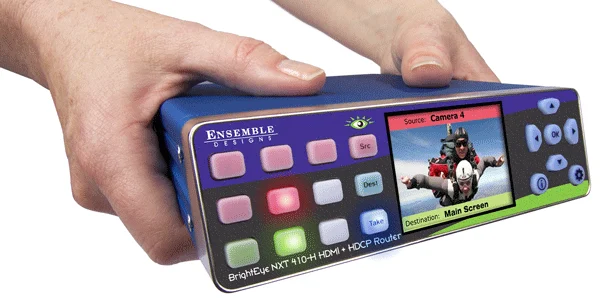
be_nxt_410-h-600x300be_nxt_410-h-600x300
  • BrightEye NXT 410-H Clean HDMI-HDCP-SDI Router w/ Up/Down/X Conversion

    The BrightEye NXT 410-H Clean HDMI-HDCP-SDI Router with Up/Down/Cross Conversion provides clean and quiet switching of HDCP encrypted content to its HDMI output along side SDI and non-encrypted HDMI sources. The BrightEye NXT 410-H lets you dissolve or cut between HDMI sources such as cameras or disk players, traditional SDI sources and HDCP encrypted devices for output to an HDMI display or projector. The router’s built-in frame syncs ensure an instantaneous, clean switch or dissolve between every source without flashing or unexpected black displays, even with completely asynchronous sources. Non-HDCP encrypted HDMI and SDI sources can be routed to SDI destinations independently and simultaneously. HDCP encrypted sources cannot be routed to SDI destinations.

    Muting Disable available with signed waiver to support HDCP Encrypted Content.

    Use Encrypted and Non-Encrypted HDMI Along Side SDI Sources

    The ability to use HDMI sources and SDI sources along side one another is perfect for live applications in remote trucks and news vehicles. Devices such as set top boxes and Blu-ray players can be switched and mixed with SDI devices and HDMI cameras to the HDMI output seamlessly and instantaneously.

    Convert While You Route

    The BrightEye NXT410-H Compact Router with U/D/C and Clean and Quiet Switching allows format conversion to take place while routing signals to destinations. Now, various formats of high definition and standard definition content can be converted to a common format and routed seamlessly to destinations. Standard definition sources can be up converted to high definition as part of the routing process, as well as cross converting from one HD format to another. All you have to do is select a SMPTE standard to output to a particular destination, and all sources routed to that destination will be converted to the format.

    Control From Anywhere

    The unique web-browser user interface allows control and set-up from virtually anywhere via any web browser enabled device, while front panel controls allow complete configuration and control of the router without the use of a computer. In addition, they can be externally controlled through either TCP/IP or DB9 connector under automation control.

    Router Salvos for Multi-Destination Simultaneous Routing

    Use salvo memory registers to execute several routes simultaneously. Eight separate salvo registers can be created and then triggered with any web browser enabled device.

    Integrate HDMI and SDI I/O

    With both HDMI and SDI inputs and outputs, the NXT 410-H makes it easy to integrate and switch signals from all types of equipment, regardless of the video format. Cameras with HDMI outputs can be used directly alongside SDI sources, and seamlessly routed to either HDMI or SDI outputs. The SFP (small format plugable) cage can be populated with dual SFPs that have fiber optic or other connectors, allowing you to determine the best connector for your installation. Adding SFPs gives you true flexibility in combining electrical BNC, HDMI and fiber optic inputs and outputs.

    Control From Third Party Devices

    BrightEye NXTs can be controlled from third party devices using serial protocols via TCP/IP, RS-232 and SNMP. If RS-232 control is desired, please specify at time of purchase and your unit will come with the connector cable pre-installed. Field installation after the fact is not supported.
    Product Documents

    Datasheets

    • BrightEye NXT Routers Brochure
    • BrightEye NXT 430 Family Card
    • NXT Logo Inserter QSG

    Manuals

    • PiP Quick Start Guide
    • BrightEye NXT Routers Quick Start Guide
    • BrightEye NXT Compact Routers Manual

    Firmware

    • BrightEye NXT 410-H Firmware 3.3.1
    Contact Sales
    • Highlights
    • Specifications
    • Product Downloads

    Description

    • Cleanly Switch HDCP Encrypted Content
    • Muting Disable available with signed waiver to support HDCP Encrypted Content
    • Up/Down/Cross Converter Built-In
    • Router for 3G, HD and SD SDI and HDMI Video
    • Dissolve and Cut Transitions
    • Direct Take Mode
    • Inserts Still and Animated Logos
    • Salvo Registers – Save/Recall from your Tablet and Computer
    • System Wide Configuration Registers
    • Flexible I/O – You Configure BNCs and SFPs as Inputs or Outputs
    • Clean Switching of Video and Embedded Audio
    • Audio Level Adjustments
    • RS-232 and TCP/IP Interfaces – Use with any 3rd Party Device
    • Front Panel and Web-Based Control
    • LCD Display with Realtime Full Motion Video of Your Sources
    • Safe Driving Mode
    • Built-in Test Signal Generators
    • Compact and Rugged
    • Genlockable and Timeable
    • 5-Year Warranty and Free Software Upgrades Forever
    Serial Digital Input
    • Number: Two to Five, configurable, BNC and SFP
    • Signal Type:
      • 270 Mb/s SD SDI, SMPTE 259M
      • 1.485 Gb/s HD SDI,SMPTE 274M, 292M, 296M
      • 2.97 Gb/s HD SDI, SMPTE 424M, 425M
    • Impedance: 75 Ω
    • Return Loss: >15 dB
    • Max Cable Length: 300 meters for 270 Mb/s, 100 meters for 1.485 Gb/s
    • Automatic Input Cable Equalization
    Reference Input
    • Number: One
    • Type: 1 V P-P Composite Video, PAL, NTSC, or Tri-Level Sync
    • Impedance: 75 Ω
    • Return Loss: >40 dB
    Serial Digital Output
    • Number: Two to Five, configurable, BNC and SFP
    • Signal Type:
      • 270 Mb/s SD SDI, SMPTE 259M
      • 1.485 Gb/s HD SDI,SMPTE 274M, 292M, 296M
      • 2.97 Gb/s HD SDI, SMPTE 424M, 425M
    • Impedance: 75 Ω
    • Return Loss: >15 dB
    • Max Cable Length: 100 meters for HD, 300 meters for SD (Belden 1694A)
    HDMI Input
    • Number: Four
    • Type: HDMI 1.3
    • Format: Supports HDMI signals which map to the video standards listed below
    HDMI Output
    • Number: One
    • Type: HDMI 1.3
    • Format: Follows input

    HDMI output can be configured to generate HDCP encryption. This allows both encrypted and non-encrypted HDMI and SDI sources to be cleanly switched to this output.

    Standards Supported
    • 1080i 50, 59.94 or 60 Hz, SMPTE 274M -4,5,6
    • 720p 50, 59.94 or 60 Hz, SMPTE 296M -1,2,3
    • 1080p 23.98, 24 or 25 Hz, SMPTE 274M -9,10,11
    • 1080p 50, 59.94, 60 Hz, SMPTE 424M, 425M, Level A
    • 1080sF 23.98, 24 or 25 Hz, RP211 -14,15,16
    • 625i 50
    • 525i 59.94
    General Specifications
    • Size: 5.63” W x 1.65” H x 6.75” D (143 mm x 42 mm x 172 mm) including connectors and flange
    • Weight: 1 lb 12oz
    • Power: 12 volts, 20 watts (100-230 VAC modular power supply)
    • Temperature Range: 0 to 40° C ambient (all specs met)
    • Relative Humidity: 0 to 95%, non-condensing
    • Altitude: 0 to 10,000 ft.

    Product Documents

    Datasheets

    • BrightEye NXT Routers Brochure
    • BrightEye NXT 430 Family Card
    • NXT Logo Inserter QSG

    Manuals

    • PiP Quick Start Guide
    • BrightEye NXT Routers Quick Start Guide
    • BrightEye NXT Compact Routers Manual

    Firmware

    • BrightEye NXT 410-H Firmware 3.3.1

    Related products you might be interested in

    BrightEye 30 Audio ADC and DACBrightEye 30 is a flexible audio converter that can be a two channel, bi-directional ADC and DAC, or it can be configured as a four channel converter. Perfect in desktop, post and broadcast applications, 24 bit processing ensures beautiful audio. As a bi-directional converter, two channels of analog audio are converted to AES digital audio and at the same time an AES stream is converted to two channels of analog. Alternately, the unit can be configured as a four channel AES to analog converter or a four channel analog to AES converter. BrightEye 30 also serves as a sample rate converter. For example, a digital 44.1 KHz signal from a CD player can be fed to the input and a digital AES3id, 48 KHz signal synchronous to the reference input will be output. Audio mixing, level adjustments, and channel shuffling are accessed through the BrightEye Control app. A variety of audio connectors and adapters are available for integrating BrightEye 30 to any type of system. A reference input is provided which allows digital outputs to be synchronized to either a PAL or NTSC video signal or AES reference.
    BrightEye 71 & 71-F HD/SD 8 Channel Analog Audio Embedder/DisembedderThe BrightEye 71 is a dual rate eight channel analog audio embedder or disembedder for 1.5Gb/s high definition video signals or for 270Mb/s standard definition signals. The analog audio ports automatically configure as inputs or outputs depending if the module is configured as mux or demux. When configured as a multiplexer, the BrightEye 71 has one serial digital video input and eight analog audio inputs. The audio streams are embedded into the video stream. The output of the module is a digital stream that contains the original video and audio signals. When configured as a demultiplexer, audio signals present in the incoming video signal are extracted and delivered as analog audio. The BrightEye 71 includes an eight channel audio mixer with channel swap and shuffle capability that allows you to completely re-arrange and re-mix audio channels. It provides precise control over audio level, with up to 12 dB of gain to compensate for low level sources. All audio processing is performed at full 24 bit resolution by a digital signal processor (DSP). Delay is adjustable up to one second. Order the BrightEye 71-F if you need an optical output.
    BrightEye 15 SDl to Analog Converter with Frame Sync/GenlockBrightEye 15 is a digital to analog video converter with a timeable output. It’s perfect for feeding analog switchers and routers, where signal timing is required. BrightEye 15 has an SD SDI video input and a reference input. The input signal is converted to analog composite and synchronized (genlocked) to the reference signal. The analog composite output is fully timed with respect to the reference, including ScH phase. Basic controls are provided on the front panel. With the BrightEye Control app, you can control video proc functions; Gain, Chroma, Pedestal, and Hue. The vertical interval can be passed or blanked.
    BrightEye 90-FA HD Up/Down Cross Converter and ARC with Analog Audio and Optical OutputBrightEye 90-FA is a versatile up/down/cross converter or aspect ratio converter for use with analog and digital video signals with the addition of an optical output. Optical connectivity allows for long cable runs between buildings or in mobile applications. Simply set the BrightEye 90-FA to output your facility’s preferred HD or SD standard. The BrightEye 90-FA will accommodate whatever input you connect analog composite, SD SDI or HD SDI. After setting the output standard, BrightEye 90-FA automatically converts the selected input to the correct standard for your facility. BrightEye 90-FA will upconvert, downconvert, cross convert, or act as an ARC, as needed. The built-in Frame Synchronizer allows you to feed asynchronous signals to the BrightEye 90-FA. An external reference input allows genlock to a house reference. All vertical interval data and closed captioning is faithfully passed. Upconverting to High Definition Feed the analog composite or SD SDI output of a camera to a BrightEye 90-FA and upconvert to HD. You can take the HD signal from the BrightEye 90-FA into a switcher or projection system. Upconverting existing SD equipment lets you leverage the equipment you already have and operate in the HD domain. While some cameras may have firewire out, using the video output and upconverting before distribution is preferable since longer cable runs can be achieved and quality is superior. Additionally, the BrightEye 90-FA’s reference input allows you to time the upconverted video output for use with a production switcher. Downconverting to Standard Definition BrightEye 90-FA will downconvert any type of HD signal and provides both an SD SDI and an analog composite output suitable for broadcast or monitoring. Cross Conversion It’s easy to convert between various HD standards, whether 720p or 1080i. Simply select the output standard you need and connect the input, that’s all there is to it. Aspect Ratio Conversion For converting between SD 4:3 and HD 16:9, BrightEye 90-FA has you covered. Just select the output standard you need and connect the input. Audio Processing Made Simple BrightEye 90-FA handles both embedded audio and eight channels of analog audio. Sixteen channels of embedded audio are supported in BrightEye 90-FA. If the incoming video has embedded audio, the audio will be safely bypassed around the video processing and lipsync will be preserved. Audio mixing is available for two of the four embedded groups of audio. The analog audio I/O ports can be configured for eight channels of incoming audio or for eight channels of audio output. The audio mixer can be used for analog audio as well. Mixer controls are accessed through the BrightEye Control app. Monitoring for Video and Audio Audio monitoring is easy with BrightEye 90-FA’s convenient 3.5mm mini jack. Select the audio channels you want to monitor from the front panel and plug in a headset. The HDMI connector on the rear of the unit provides a future proof monitoring interface. Plug it into most LCD monitors for confidence monitoring of your feed. Front Panel and Software Control Input selection, gain control, and test patterns control are provided through the front panel interface. Audio presence LEDs indicate which channels are detected. Controls for crop, letterbox and pillarbox are accessed from the front panel or the BrightEye Control software. Video and audio levels and the audio mixer can be adjusted through BrightEye Control.

    Looking for something else?

    Signal Processing
    I.M.D.P.
    Monitors
    Timing
    Calibration
    Viewfinders

    Contact Sales

    International

    • Plura Europe GmbH Germany
    • Plura MEA Dubai – UAE
    • Plura ASIA Seoul – S. Korea

    The Americas

    • Arizona Plura Broadcast, Inc. HQ

    Stay in touch for news on the latest in product development

    Copyright © 2026 Plura Inc. All Rights Reserved.