• Skip to main content
  • Why Plura
    • Our Team
    • Videos
    • 15th Anniv.
    • Our History
    • Case Studies
    • Distributors
  • Products
    • At a Glance
    • X Processing
    • I.M.D.P.
    • Monitors
    • Timing
    • Calibration
    • Viewfinders
  • Support +
    • Downloads
    • Virtual Mtg.
    • RMA Request
  • News & Events
    • News
    • Events
  • Contact
  • Why Plura
    • Our Team
    • Videos
    • 15th Anniv.
    • Our History
    • Case Studies
    • Distributors
  • Products
    • At a Glance
    • X Processing
    • I.M.D.P.
    • Monitors
    • Timing
    • Calibration
    • Viewfinders
  • Support +
    • Downloads
    • Virtual Mtg.
    • RMA Request
  • News & Events
    • News
    • Events
  • Contact
Signal Processing
I.M.D.P.
Monitors
Timing
Calibration
Viewfinders
Home  //  Signal Processing  //  Avenue  //  Avenue 7435 HD / SD Clean and Quiet Protection Switch
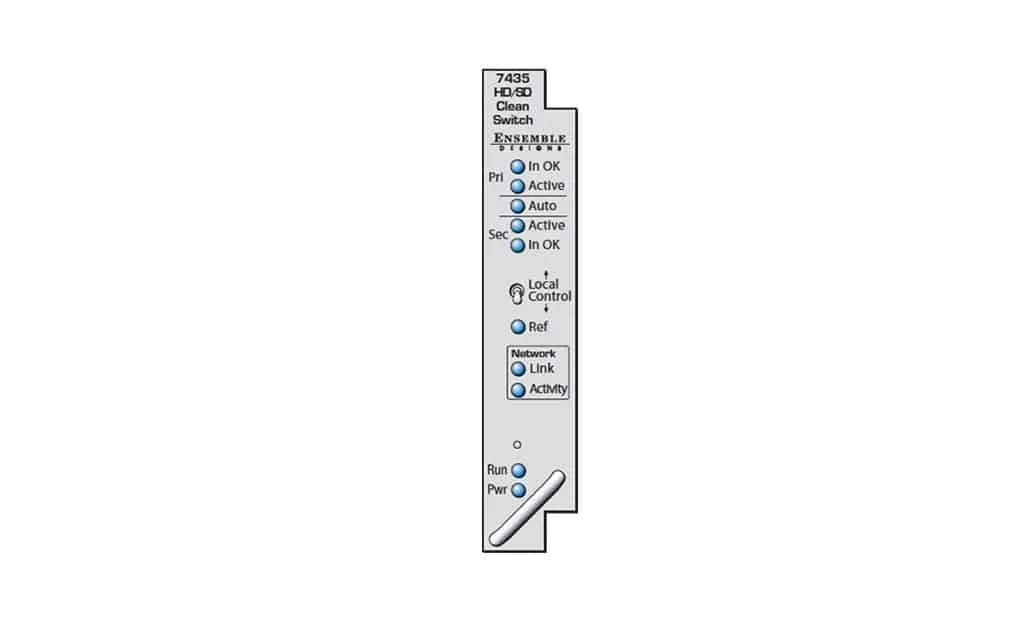
avenue_7435_front-1021x623avenue_7435_front-1021x623
  • Avenue 7435 HD / SD Clean and Quiet Protection Switch

    The 7435 module is a clean and quiet protection switch for critical broadcast and satellite feeds. It switches cleanly between asynchronous sources which means it can be used live to air. The module has a full video frame synchronizer, rather than a line delay, ensuring perfect alignment of mis-timed and non-synchronous SDI sources.

    Clean and quiet switching between sources requires that they be synchronous and precisely timed to each other. The 7435 accomplishes this automatically, with integral frame synchronization of the inputs, allowing operation with both synchronous and asynchronous (wild) sources. This frame synchronization feature not only means that the output of the 7435 will always be stable and glitch-free, but it also means that in the event of a total loss of both inputs, consistently timed color black will still be output.

    These internal frame synchronizers can be genlocked to an external reference signal so that the output of the 7435 is synchronoA Clean Switch That’s Glitch-Free The 7435 module is a clean and quiet protection switch for critical broadcast and satellite feeds. It switches cleanly between asynchronous sources which means it can be used live to air. The module has a full video frame synchronizer, rather than a line delay, ensuring perfect alignment of mis-timed and non-synchronous SDI sources.

    Clean and quiet switching between sources requires that they be synchronous and precisely timed to each other. The 7435 accomplishes this automatically, with integral frame synchronization of the inputs, allowing operation with both synchronous and asynchronous (wild) sources. This frame synchronization feature not only means that the output of the 7435 will always be stable and glitch-free, but it also means that in the event of a total loss of both inputs, consistently timed color black will still be output.

    These internal frame synchronizers can be genlocked to an external reference signal so that the output of the 7435 is synchronous to local sources. Alternately, in teleports, headends, and other multi-service facilities, where there is no logical common reference, the 7435 will internally generate an accurate reference.
    The delay through the 7435 can be adjusted from one to eight frames, with independent control for the Primary and Secondary input paths. By operating with several frames of delay, the fault detection algorithms are given enough time to detect a failure in an input signal and switch to the backup before the fault has actually appeared on-air.

    Perfect Audio

    Glitch-free, quiet switching of embedded audio signals is achieved with the 7435’s precise synchronization and alignment of audio sources. Digital audio is de-embedded, and if it is linear PCM, sample rate converted, switched, and re-embedded. Encoded audio streams such as Dolby™ E are de-embedded and re-embedded but not processed in any way. PCM audio is supported with asynchronous sources, operation of encoded audio requires all sources to be synchronous, but not necessarily in time.

    Switch Logic

    When a fault is detected in the primary input to the 7435, and the secondary input is verified as good, the switch will activate, causing the secondary input to be switched to the module’s output. The 7435 includes a passive, fail-safe path that ensures there is an output even in the event of a total power failure. The module can be set to automatically switch back to the primary after the fault condition clears. If both the primary and the secondary inputs signals are faulted, no switch occurs.

    The health of a high definition or standard definition video signal is determined by monitoring crucial parameters in order of increasing complexity; Timing Reference Signal (TRS), or a persistent loss of digital sync is tested first. Black, Embedded Audio and Freeze are also evaluated. Each test can be configured by the user. For example, the sophisticated Black Detector includes configurable parameters for black level threshold, pixel count, and duration time.

    The Freeze detection system can be set to detect a clean or noisy source. Freeze Time sets the number of seconds for the 7435 to switch to the secondary input after a video freeze condition is detected in the primary input.

    Control and Alarms

    Module controls are easily accessed through an Avenue Control Panel, Avenue PC software, GPIs, or the module’s front edge controls. GPI inputs allow faults detected in upstream equipment to contribute to the switching logic. us to local sources. Alternately, in teleports, headends, and other multi-service facilities, where there is no logical common reference, the 7435 will internally generate an accurate reference.

    Product Documents

    Datasheet

    • 7435 Data Sheet

    Manual

    • 9455 and 7435 Module Manual

    Firmware

    • Avenue 7435 Firmware v1.0.7
    Contact Sales
    • Highlights
    • Specifications
    • Product Downloads

    Description

    • Clean and quiet switch for SD and HD SDI signals
    • Use for clean switching of asynchronous sources for critical, live feeds
    • Full frame synchronizer with adjustable delay
    • Quiet audio switching
    • Passes embedded audio
    • External genlock reference input
    • GPIs and TCP/IP for automation control
    • Fail-safe bypass in case of power failure
    • Local and remote control
    • Memory Registers
    Input
    • Number Two
    • Signal Type HD Serial Digital 1.485 Gb/s
    • SMPTE 274M, 292M or 296M
    • SD Serial Digital 270 Mb/s
    • SMPTE 259M
    • Data as per SMPTE 337M
    • Impedance 75 Ω
    • Return Loss >15 dB to 1.5 GHz
    • Max Cable Length 270 Mb/s 300 meters
    • 1.485 Gb/s 100 meters
    • Automatic Cable Input Equalization
    Standards Supported
    • 1080i (SMPTE 274M -4,5,6) 50, 59.94 or 60 Hz
    • 720p (SMPTE 296M -1,2,3) 50, 59.94 or 60 Hz
    • 1080p (SMPTE 274M -9,10,11) 23.98, 24, 25 Hz
    • 1080sF (RP211 -14,15,16) 23.98, 24, 25 Hz
    • 525i 59.94, 625i 50
    Serial Digital Loopback
    • Number Two total
    • One primary
    • One secondary
    • Impedance 75 Ω
    Output
    • Number Six (includes one fail-safe bypass)
    • Signal Type HD or SD Serial Digital, follows input
    • Delay Adjustable up to 8 frames
    • Impedance 75 Ω
    • Return Loss >15 dB DC to 1.5 GHz
    Reference Input
    • Number One external (modules BNC)
    • One internal (frame master ref BNC)
    • Signal Type PAL or NTSC composite video or
    • HD Tri-Level Sync
    • Return Loss >40 dB
    General Specifications
    • Power Consumption 10 watts
    • Temperature Range 0 to 40°C ambient (all specs met)
    • Relative Humidity 0 to 95%, noncondensing
    • Altitude 0 to 10,000 ft

    Product Documents

    Datasheet

    • 7435 Data Sheet

    Manual

    • 9455 and 7435 Module Manual

    Firmware

    • Avenue 7435 Firmware v1.0.7

    Related products you might be interested in

    BrightEye Control SoftwareBrightEye Control allows you to access all of the controls in your BrightEye devices. Adjust video levels, output timing and audio mixing and more. No DIP switches or button hold-downs are needed. Firmware updates, with feature enhancements and bug fixes, are provided for the lifetime of your BrightEye device. Install them with ease from your Mac or PC using BrightEye Control. The BrightEye Control software is included with each BrightEye at no charge. Version History 3.2.2 Fixes window resizing issue on Windows when using Hi-DPI displays. Only released for Windows (32-bit and 64-bit). 3.2.1 Hi-DPI Support on Windows. Control fixes and performance improvements. First Windows 64-bit build. Compatible with Windows 7, 8, 10, and 11 First Apple Silicon native release. Compatible with macOS 10.15+ 3.1.0 Built for Intel x86 64-bit. Compatible with Apple Silicon Macs via emulation. Compatible with macOS 10.15+ Only released for macOS. 3.0.2 Further improvements to connection reliability, especially with older BrightEye devices. Fixes issue with recalling saved settings on units with memory registers. Previously, recalling the saved settings could trigger memory register recalls. You can now set string controls to “”, which allows you to properly remove a feature license. Fixes several crashes related to connecting and disconnecting BrightEye devices. Other small fixes and enhancements. 3.0.1 Improved Connection Reliability Fixed problem where updating BrightEye firmware was sometimes slow. 3.0.0 Replaces BrightEye Mac and BrightEye PC. Improved user interface to make controlling BrightEye devices easier than ever. BrightEye devices now show up in the interface automatically, no need to manually refresh. Improved performance when controlling many BrightEye devices. Support for HiDPI and “Retina” displays. Fixed issues with firmware updates on newer Windows PC’s. Many other bug fixes and enhancements.
    BEM-1-H, BrightEye Mitto 3G, 3G/HD/SD Scan Converter w/HDCP SupportUse BrightEye Mitto™ BEM-1-H to deliver DVI, HDMI, and VGA sources to 3G, HD and SD SDI video resolutions. Ensemble Designs’ proprietary scaling and filtering technology ensures that Mitto always produces a pristine, detailed video output. Even the most demanding CGI material is faithfully rendered to television. YouTube, Zoom, Tik-Tok, and Everything Else Made Easy Take just about any source to 3G, HD or SD SDI video. Computer video can now be used for the most demanding applications including broadcast, high-end military, medical, classroom, church and corporate. Just a small part of the screen, such as a Tik-Tok video, can be selected with a mouse and converted to full screen HD. Mitto delivers the best looking video – compare Mitto to any other scan converter and see the difference! HDCP is not a Problem Many systems now require HDCP for video playback, regardless of content licensing. BEM-2-H can handle HDCP encrypted content with the added BEM-HDCP option. Muting Disable available with the purchase of option BEM-HDCP license and signed waiver. BrightEye Control Software Using BrightEye control software, you can easily time BrightEye Mitto into a video production switcher or router. From your desktop, you have complete and intuitive control of video format, video levels, output timing, mixing audio channels, and audio delay. Pristine, Detailed Video Output A superior quality scan converter, BrightEye Mitto has the advantage of proprietary scaling technology and exclusive multi-tap filtering. Even a small part of the computer screen, such as a YouTube video, will be upconverted to full screen HD. The region selected for output determines if Mitto acts as an up converter or downconverter. The output looks as good, or better, than the original and passes the most stringent testing. Easy To Use Use the Selection Tool in BrightEye Control to select what portion of the screen you want to output. The Selection Tool floats over the content on your display, showing the portion of the video that will be output from BrightEye Mitto. Use Your Mouse To Select What is Output to Video Use your mouse to click and drag over the specific portion of computer video that you want to output. The perspective of seeing the whole screen relative to your selection gives you the ability to choose exactly which portion of the video you want to scan convert for output. Resize the selection window by clicking and dragging with your mouse. Mitto’s video output automatically goes to pillarbox or letterbox as needed. Mitto automatically maintains perfect aspect ratio. Digital and Analog Video and Audio The intuitive front panel interface makes it easy to choose the desired video output format. The genlock reference input allows the video outputs to be timed to house. Audio can be input through the DVI (or HDMI with adapter) input, or the 3.5mm audio input. The audio input accepts analog audio or AES digital audio. Audio is embedded into the SDI outputs – which is required for many high end applications. Audio delay controls let you adjust the audio timing with respect to video for perfect lip sync, which is crucial when using Zoom, Google Meet, or Microsoft Teams video in a production environment.
    BrightEye 30 Audio ADC and DACBrightEye 30 is a flexible audio converter that can be a two channel, bi-directional ADC and DAC, or it can be configured as a four channel converter. Perfect in desktop, post and broadcast applications, 24 bit processing ensures beautiful audio. As a bi-directional converter, two channels of analog audio are converted to AES digital audio and at the same time an AES stream is converted to two channels of analog. Alternately, the unit can be configured as a four channel AES to analog converter or a four channel analog to AES converter. BrightEye 30 also serves as a sample rate converter. For example, a digital 44.1 KHz signal from a CD player can be fed to the input and a digital AES3id, 48 KHz signal synchronous to the reference input will be output. Audio mixing, level adjustments, and channel shuffling are accessed through the BrightEye Control app. A variety of audio connectors and adapters are available for integrating BrightEye 30 to any type of system. A reference input is provided which allows digital outputs to be synchronized to either a PAL or NTSC video signal or AES reference.
    Avenue 3RU FrameThe 3RU frame is a full-featured chassis that accommodates any ten Avenue modules. Modules plug into a universal motherboard so that rear modules are not needed. In addition to the ten module slots, there is a dedicated slot for the optional 5030 System Control module. One universal power supply comes with each frame. Redundant supply is optional and does not take up a slot in the frame. Touch Screen front door or plain front door are available. Plastic overlays for each module type are provided and slip over the corresponding BNCs on the backplane to identify the input and output designations on each type of module. In addition to the ten audio and video modules, the optional 5030 System Control Module adds a variety of control capabilities. All modules are hot-swappable and because of the universal backplane, no special rear connectors are needed. 5020 Power Supply Each Avenue 3RU frame comes with one 5020 Power Supply module installed. An optional redundant power supply is available if desired to provide backup. Power is provided to all modules in the frame, the front door fan and optional Avenue Touch Screen Panel. Frame Specifications The Avenue 3RU (5.25 inches) frame fits in a standard 19-inch rack. Any number of frames may be stacked together in any combination. A fan in the front door of each 3RU frame provides the necessary cooling for the frame. The fan is temperature-sensitive and adjusts its speed accordingly. Should the fan fail, a red LED will light on the front panel. If using a remote control option, an alarm can be set to alert the user of fan failure. All critical components such as fuses, filter and fan are accessible from the front of the unit.

    Looking for something else?

    Signal Processing
    I.M.D.P.
    Monitors
    Timing
    Calibration
    Viewfinders

    Contact Sales

    International

    • Plura Europe GmbH Germany
    • Plura MEA Dubai – UAE
    • Plura ASIA Seoul – S. Korea

    The Americas

    • Arizona Plura Broadcast, Inc. HQ

    Stay in touch for news on the latest in product development

    Copyright © 2026 Plura Inc. All Rights Reserved.