• Skip to main content
  • Why Plura
    • Our Team
    • Videos
    • 15th Anniv.
    • Our History
    • Case Studies
    • Distributors
  • Products
    • At a Glance
    • X Processing
    • I.M.D.P.
    • Monitors
    • Timing
    • Calibration
    • Viewfinders
  • Support +
    • Downloads
    • Virtual Mtg.
    • RMA Request
  • News + Events
    • News
    • Events
  • Contact
  • Why Plura
    • Our Team
    • Videos
    • 15th Anniv.
    • Our History
    • Case Studies
    • Distributors
  • Products
    • At a Glance
    • X Processing
    • I.M.D.P.
    • Monitors
    • Timing
    • Calibration
    • Viewfinders
  • Support +
    • Downloads
    • Virtual Mtg.
    • RMA Request
  • News + Events
    • News
    • Events
  • Contact
Signal Processing
I.M.D.P.
Monitors
Timing
Calibration
Viewfinders
Home  //  Signal Processing  //  Avenue  //  BrightEye NXT Action Control Panel
Avenue_be_nxt_450-action_cp_front-1021x623Avenue_be_nxt_450-action_cp_front-1021x623
  • BrightEye NXT Action Control Panel

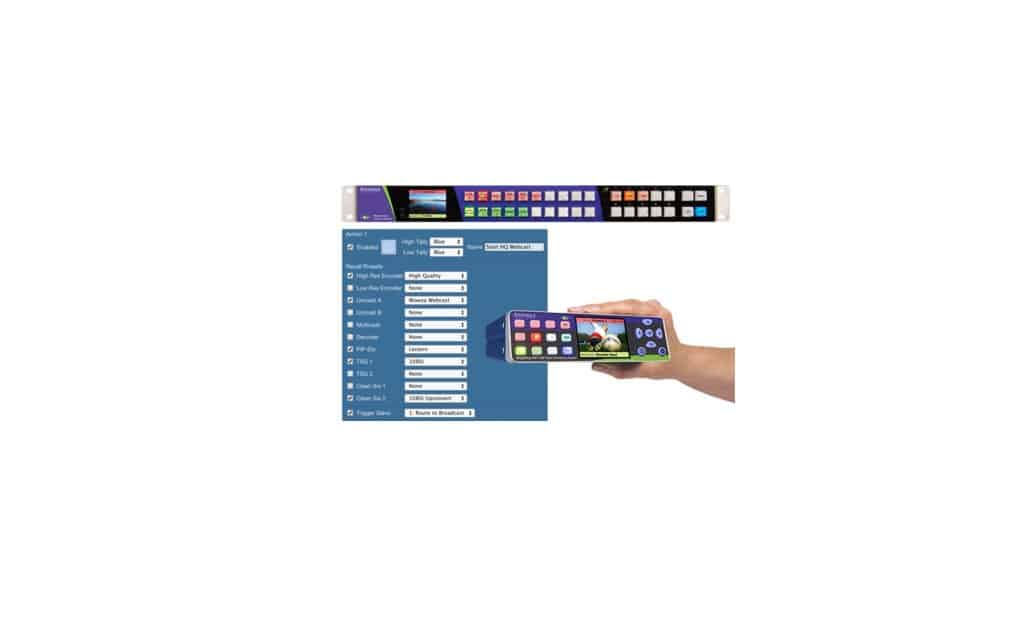
    The 5835 Action Control Panel for the BrightEye NXT Family of Routers is fully customizable to suit your exact application. It offers Thumbnail preview so you can see your Sources before doing a Take or Mix transition. The Action Keys are fully programmable. Create multiple custom presets to recall different sets (or subsets) of parameters in different groups of controls.

    Product Documents

    Datasheets

    • BrightEye NXT PiP-Efx Data Sheet
    • 5835 Action Control Panel Application Example
    • 5835 Action Control Panel Infographic
    • BrightEye NXT Routers Brochure
    Contact Sales
    • Highlights
    • Specifications
    • Product Downloads

    Description

    • Fully Programmable Action Keys for Recalling Presets
    • LCD Thumbnail Preview – See Your Sources Before Doing a Take or Mix Transition
    • Provides Hard Surface Control Panel for Salvos
    • Use Action Keys to Recall PiP Presets (450, 445, 430-X, 410-H)
    Additional information

    Control

    Ethernet, GPIO

    Product Documents

    Datasheets

    • BrightEye NXT PiP-Efx Data Sheet
    • 5835 Action Control Panel Application Example
    • 5835 Action Control Panel Infographic
    • BrightEye NXT Routers Brochure

    Related products you might be interested in

    BrightEye 11-HD HD/SD SDI to Analog ConverterBrightEye 11-HD provides HD or SD digital to analog video conversion with the full range of analog output formats available for HD and SD. When an HD input is present HD RGB or YPrPb are output. When an SD input is present Beta, SMPTE, RGB or composite with simultaneous Y/C is output. 12 bit processing and conversion at 8 x oversampling mean the best looking images possible. Output format and gain are controlled from the front panel. A status display indicates input presence. Video levels can be adjusted through the BrightEye Control app.
    BrightEye Control SoftwareBrightEye Control allows you to access all of the controls in your BrightEye devices. Adjust video levels, output timing and audio mixing and more. No DIP switches or button hold-downs are needed. Firmware updates, with feature enhancements and bug fixes, are provided for the lifetime of your BrightEye device. Install them with ease from your Mac or PC using BrightEye Control. The BrightEye Control software is included with each BrightEye at no charge. Version History 3.2.2 Fixes window resizing issue on Windows when using Hi-DPI displays. Only released for Windows (32-bit and 64-bit). 3.2.1 Hi-DPI Support on Windows. Control fixes and performance improvements. First Windows 64-bit build. Compatible with Windows 7, 8, 10, and 11 First Apple Silicon native release. Compatible with macOS 10.15+ 3.1.0 Built for Intel x86 64-bit. Compatible with Apple Silicon Macs via emulation. Compatible with macOS 10.15+ Only released for macOS. 3.0.2 Further improvements to connection reliability, especially with older BrightEye devices. Fixes issue with recalling saved settings on units with memory registers. Previously, recalling the saved settings could trigger memory register recalls. You can now set string controls to “”, which allows you to properly remove a feature license. Fixes several crashes related to connecting and disconnecting BrightEye devices. Other small fixes and enhancements. 3.0.1 Improved Connection Reliability Fixed problem where updating BrightEye firmware was sometimes slow. 3.0.0 Replaces BrightEye Mac and BrightEye PC. Improved user interface to make controlling BrightEye devices easier than ever. BrightEye devices now show up in the interface automatically, no need to manually refresh. Improved performance when controlling many BrightEye devices. Support for HiDPI and “Retina” displays. Fixed issues with firmware updates on newer Windows PC’s. Many other bug fixes and enhancements.
    Avenue 3RU FrameThe 3RU frame is a full-featured chassis that accommodates any ten Avenue modules. Modules plug into a universal motherboard so that rear modules are not needed. In addition to the ten module slots, there is a dedicated slot for the optional 5030 System Control module. One universal power supply comes with each frame. Redundant supply is optional and does not take up a slot in the frame. Touch Screen front door or plain front door are available. Plastic overlays for each module type are provided and slip over the corresponding BNCs on the backplane to identify the input and output designations on each type of module. In addition to the ten audio and video modules, the optional 5030 System Control Module adds a variety of control capabilities. All modules are hot-swappable and because of the universal backplane, no special rear connectors are needed. 5020 Power Supply Each Avenue 3RU frame comes with one 5020 Power Supply module installed. An optional redundant power supply is available if desired to provide backup. Power is provided to all modules in the frame, the front door fan and optional Avenue Touch Screen Panel. Frame Specifications The Avenue 3RU (5.25 inches) frame fits in a standard 19-inch rack. Any number of frames may be stacked together in any combination. A fan in the front door of each 3RU frame provides the necessary cooling for the frame. The fan is temperature-sensitive and adjusts its speed accordingly. Should the fan fail, a red LED will light on the front panel. If using a remote control option, an alarm can be set to alert the user of fan failure. All critical components such as fuses, filter and fan are accessible from the front of the unit.
    BrightEye 20 Analog and Digital Audio Embedder or DisembedderBrightEye 20 is a versatile audio Mux/Demux. With SDI video I/O, and both analog and AES I/O, it is field configurable for embedding or disembedding. When configured as a multiplexer, BrightEye 20 has one serial digital video input and two AES digital audio inputs. Alternately, the 4 channel analog audio input can be used. The audio is embedded into the 601 video stream. The output is a serial digital video stream that contains the original video plus the two AES streams or four analog audio channels. When configured as a demultiplexer, audio signals present in the incoming serial digital video signal are extracted and delivered simultaneously as two AES digital audio streams and as four analog audio channels. Audio mixing, level adjustments, and channel shuffling can be applied to both the multiplexer and demultiplexer modes, and are accessed through the BrightEye Control app. Audio group selection is also made through BrightEye Control. A variety of audio connectors and adapters are available for integrating BrightEye 20 to any type of system.

    Looking for something else?

    Signal Processing
    I.M.D.P.
    Monitors
    Timing
    Calibration
    Viewfinders

    Contact Sales

    International

    • Plura Europe GmbH Germany
    • Plura MEA Dubai – UAE
    • Plura ASIA Seoul – S. Korea

    The Americas

    • Arizona Plura Broadcast, Inc. HQ

    Stay in touch for news on the latest in product development

    Copyright © 2026 Plura Inc. All Rights Reserved.