• Skip to main content
  • Why Plura
    • Our Team
    • Videos
    • 15th Anniv.
    • Our History
    • Case Studies
    • Distributors
  • Products
    • At a Glance
    • X Processing
    • I.M.D.P.
    • Monitors
    • Timing
    • Calibration
    • Viewfinders
  • Support +
    • Downloads
    • Virtual Mtg.
    • RMA Request
  • News & Events
    • News
    • Events
  • Contact
  • Why Plura
    • Our Team
    • Videos
    • 15th Anniv.
    • Our History
    • Case Studies
    • Distributors
  • Products
    • At a Glance
    • X Processing
    • I.M.D.P.
    • Monitors
    • Timing
    • Calibration
    • Viewfinders
  • Support +
    • Downloads
    • Virtual Mtg.
    • RMA Request
  • News & Events
    • News
    • Events
  • Contact
Signal Processing
I.M.D.P.
Monitors
Timing
Calibration
Viewfinders
Home  //  Signal Processing  //  Avenue  //  Avenue 3RU Frame
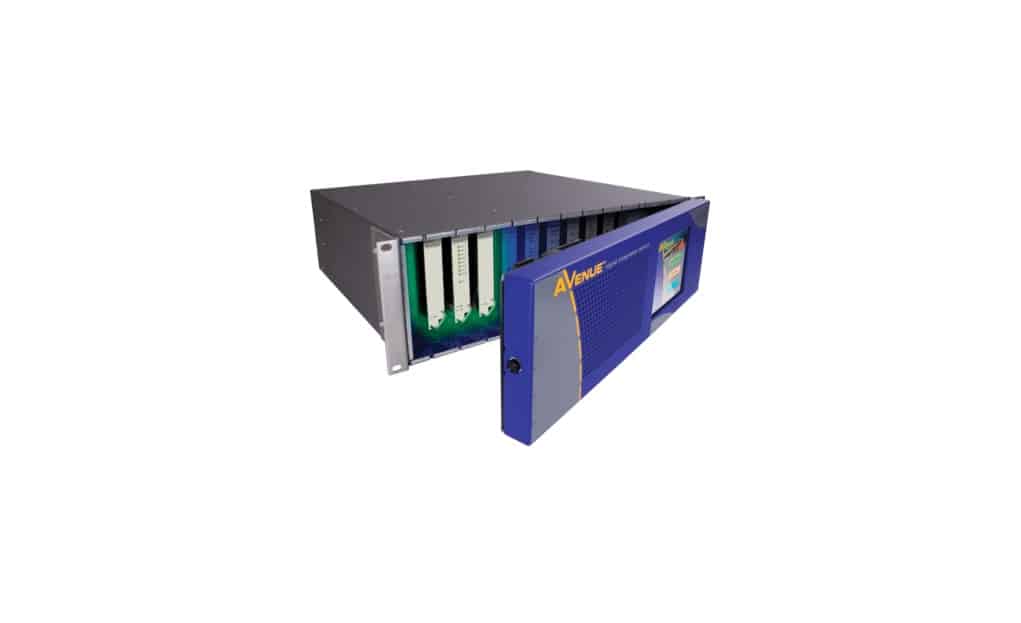
avenue_3rufrm-1021x623avenue_3rufrm-1021x623
  • Avenue 3RU Frame

    The 3RU frame is a full-featured chassis that accommodates any ten Avenue modules. Modules plug into a universal motherboard so that rear modules are not needed. In addition to the ten module slots, there is a dedicated slot for the optional 5030 System Control module. One universal power supply comes with each frame. Redundant supply is optional and does not take up a slot in the frame. Touch Screen front door or plain front door are available. Plastic overlays for each module type are provided and slip over the corresponding BNCs on the backplane to identify the input and output designations on each type of module. In addition to the ten audio and video modules, the optional 5030 System Control Module adds a variety of control capabilities. All modules are hot-swappable and because of the universal backplane, no special rear connectors are needed.

    5020 Power Supply

    Each Avenue 3RU frame comes with one 5020 Power Supply module installed. An optional redundant power supply is available if desired to provide backup. Power is provided to all modules in the frame, the front door fan and optional Avenue Touch Screen Panel.

    Frame Specifications

    The Avenue 3RU (5.25 inches) frame fits in a standard 19-inch rack. Any number of frames may be stacked together in any combination.

    A fan in the front door of each 3RU frame provides the necessary cooling for the frame. The fan is temperature-sensitive and adjusts its speed accordingly. Should the fan fail, a red LED will light on the front panel. If using a remote control option, an alarm can be set to alert the user of fan failure. All critical components such as fuses, filter and fan are accessible from the front of the unit.

    Product Documents

    Manuals

    • 5030/5035 Control Module Manual
    • Avenue System Overview
    • High Power Module Watt Budgeting Guide for Avenue 3RU Frames
    Contact Sales
    • Highlights
    • Specifications
    • Product Downloads

    Description

    • Use with 3 Gb/s, HD, SD, MPEG and Audio modules
    • Universal backplane
    • Optional System Control module provides Ethernet, AveNet and serial interface
    • Network all frames together for streamlined control
    • SNMP monitoring and control

    Additional information

    Control

    Ethernet, RS232, SNMP, AveNet, GPIO

    Product Documents

    Manuals

    • 5030/5035 Control Module Manual
    • Avenue System Overview
    • High Power Module Watt Budgeting Guide for Avenue 3RU Frames

    Related products you might be interested in

    BrightEye 15 SDl to Analog Converter with Frame Sync/GenlockBrightEye 15 is a digital to analog video converter with a timeable output. It’s perfect for feeding analog switchers and routers, where signal timing is required. BrightEye 15 has an SD SDI video input and a reference input. The input signal is converted to analog composite and synchronized (genlocked) to the reference signal. The analog composite output is fully timed with respect to the reference, including ScH phase. Basic controls are provided on the front panel. With the BrightEye Control app, you can control video proc functions; Gain, Chroma, Pedestal, and Hue. The vertical interval can be passed or blanked.
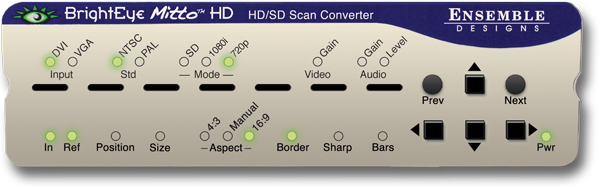
    BEM-1-H, BrightEye Mitto 3G, 3G/HD/SD Scan Converter w/HDCP SupportUse BrightEye Mitto™ BEM-1-H to deliver DVI, HDMI, and VGA sources to 3G, HD and SD SDI video resolutions. Ensemble Designs’ proprietary scaling and filtering technology ensures that Mitto always produces a pristine, detailed video output. Even the most demanding CGI material is faithfully rendered to television. YouTube, Zoom, Tik-Tok, and Everything Else Made Easy Take just about any source to 3G, HD or SD SDI video. Computer video can now be used for the most demanding applications including broadcast, high-end military, medical, classroom, church and corporate. Just a small part of the screen, such as a Tik-Tok video, can be selected with a mouse and converted to full screen HD. Mitto delivers the best looking video – compare Mitto to any other scan converter and see the difference! HDCP is not a Problem Many systems now require HDCP for video playback, regardless of content licensing. BEM-2-H can handle HDCP encrypted content with the added BEM-HDCP option. Muting Disable available with the purchase of option BEM-HDCP license and signed waiver. BrightEye Control Software Using BrightEye control software, you can easily time BrightEye Mitto into a video production switcher or router. From your desktop, you have complete and intuitive control of video format, video levels, output timing, mixing audio channels, and audio delay. Pristine, Detailed Video Output A superior quality scan converter, BrightEye Mitto has the advantage of proprietary scaling technology and exclusive multi-tap filtering. Even a small part of the computer screen, such as a YouTube video, will be upconverted to full screen HD. The region selected for output determines if Mitto acts as an up converter or downconverter. The output looks as good, or better, than the original and passes the most stringent testing. Easy To Use Use the Selection Tool in BrightEye Control to select what portion of the screen you want to output. The Selection Tool floats over the content on your display, showing the portion of the video that will be output from BrightEye Mitto. Use Your Mouse To Select What is Output to Video Use your mouse to click and drag over the specific portion of computer video that you want to output. The perspective of seeing the whole screen relative to your selection gives you the ability to choose exactly which portion of the video you want to scan convert for output. Resize the selection window by clicking and dragging with your mouse. Mitto’s video output automatically goes to pillarbox or letterbox as needed. Mitto automatically maintains perfect aspect ratio. Digital and Analog Video and Audio The intuitive front panel interface makes it easy to choose the desired video output format. The genlock reference input allows the video outputs to be timed to house. Audio can be input through the DVI (or HDMI with adapter) input, or the 3.5mm audio input. The audio input accepts analog audio or AES digital audio. Audio is embedded into the SDI outputs – which is required for many high end applications. Audio delay controls let you adjust the audio timing with respect to video for perfect lip sync, which is crucial when using Zoom, Google Meet, or Microsoft Teams video in a production environment.
    BrightEye 16 SDI to Analog Video Converter with Frame Sync/Genlock and Audio DisembedderBrightEye 16 is a digital to analog video converter with a timeable output. It’s perfect for feeding analog switchers and routers, where signal timing is required. It’s also a disembedder and provides four analog audio outputs. With timing controls, proc adjustments, and a built-in audio mixer, BrightEye 16 provides a complete solution for digital to analog conversion. BrightEye 16 has an SDI video input and a reference input. The input signal is converted to analog composite and synchronized (genlocked) to the reference signal. The analog composite output is fully timed with respect to the reference, including ScH phase. Audio is disembedded with 24 bit precision and converted to analog. Basic controls are accessed on the front panel. Use the BrightEye Control app to access video proc controls and the built-in audio mixer. The vertical interval can be passed or blanked. VU indication is provided on the front panel and BrightEye Control.
    BrightEye Rack Mount and Power SuppliesBrightEye Rack Mount You can install 3 to 6 BrightEyes with the optional BERKMT-Full rack mount kit. 6 single high units or 3 double high units fit in just 1RU. BrightEye Individual Power Supply Power a single BrightEye unit with this universal (100/240V, 50/60Hz) power supply. Power supply p/n 23118900 2.5A supply is for use with: BrightEye models 1 – 94; BrightEye Mitto; Avenue 5830 Router Control Panel; Avenue Tabletop Control Panel; and Avenue GPI Control Panel Power supply p/n 23600106 5A supply is for use with: BrightEye NXT; Avenue 1RU Frame; and BEPS6 Spider Power Supply – BEPS6 Power up to 6 BrightEyes with this universal (100/240V, 50/60Hz) power supply. Redundant power supply for Spider available, BEPS6-RP. (Powers up to 6 BrightEye models 1 – 94 and Mitto; not for use with BrightEye NXT)

    Looking for something else?

    Signal Processing
    I.M.D.P.
    Monitors
    Timing
    Calibration
    Viewfinders

    Contact Sales

    International

    • Plura Europe GmbH Germany
    • Plura MEA Dubai – UAE
    • Plura ASIA Seoul – S. Korea

    The Americas

    • Arizona Plura Broadcast, Inc. HQ

    Stay in touch for news on the latest in product development

    Copyright © 2026 Plura Inc. All Rights Reserved.